Blue ink
Students · New graduates
Ink-blue serif type and thin rules, neat for first-time job seekers.
Accent colour

Explore jobs
Find jobsBy keyword, location and salaryLatest jobsJust postedUrgent jobsEmployers hiring right awayHigh-paying jobsSorted by highest salaryRemote jobsRemote, work from home or hybridPart-time jobsGood for earning extra incomeGeneral labour jobsPaid by the hour, shift or day; no CV neededInternshipsFor students and newcomersJob market reportMonthly pay and hiring demandManage your job search
Jobs matched to youSuggestions based on your profileSaved jobsJob posts you bookmarkedApplied jobsTrack your application statusJob alertsGet an email when new jobs matchEmployers who want to connectInvitations awaiting your replyEmployers who viewed your profileSee who opened your profileCreate a CV
Create a new CVIndustry-standard CV templatesATS-friendly CV templatesEasier to pass applicant screeningSimple CV templatesClean, easy-to-read layoutEye-catching CV templatesIdeal for creative fieldsMatch your CV to a job postFind the keywords your CV is missingFor candidates
Gross and net salaryConvert gross and take-home payCompound interestEstimate how your savings growPersonal income taxTax due in each bracketUnemployment benefitYour benefit after leaving a jobSavings planHow much to save each monthLump-sum social insurancePayout based on time contributedMaternity benefitWhat you receive on maternity leaveSickness benefitSick pay and days coveredPick a CV template that fits the job, fill it in right on the page and change colours and fonts as you like. Download a PDF or send employers a link.
Students · New graduates
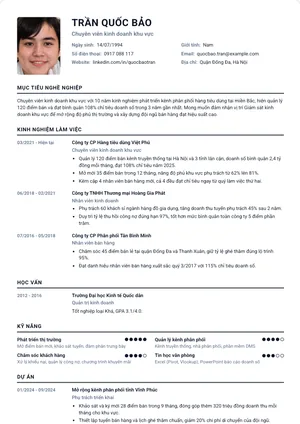
Ink-blue serif type and thin rules, neat for first-time job seekers.
Design · Advertising
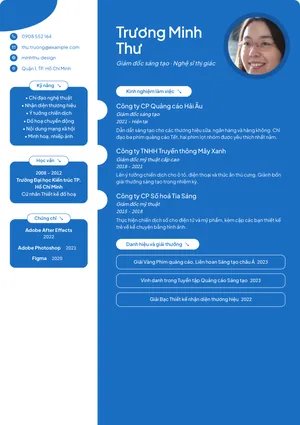
Blue main column and rounded label headings, ideal for creative roles.
Beauty · Hairstyling
Plum column on cream with elegant gold ornaments.
Customer service · New graduates
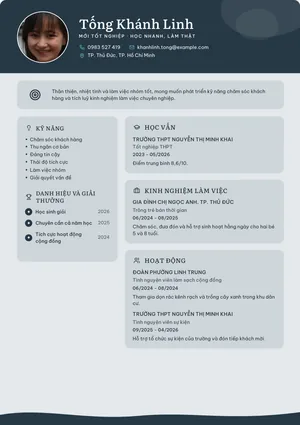
Slate-grey header, rounded blocks and a soft wave at the bottom.
International development · Programme management
Cream background, earthy brown text and section titles in the left margin.
Retail · Coffee shops
Soft sage green, a handwritten name and a wavy photo frame.
Restaurants · Hotels
Bright peach and jade with friendly rounded blocks.
All industries
A familiar single column, easy to read and suitable for any industry.
All industries
Bold left column with your experience on the right.
Office
Centred headings and fine rules for a refined look.
Creative
Colour band header with an icon for every section.
All industries
Plenty of white space and no rules.
Management
Timeline on the left and a colour band header.
Information technology
Charcoal sidebar with code-style headings.
Accounting · Finance
Formal serif type in a trustworthy deep green.
Marketing · Communications
Vivid diagonal colour band and skills shown as tags.
Design · Creative
Pastel cards in the sidebar and a round photo with a coloured ring.
Healthcare · Pharmacy
Clean teal with soft rounded corners.
Education · Research
Classic serif type with centred headings.
Management · Business
Graphite band with elegant brass-gold lines.
HR · Administration
Light rounded left column with circular icons.
Engineering · Construction
Technical drawing frame with wide, crisp type.
Tourism · Hospitality
Airy centred type with a soft wave at the bottom.
Students · Internships
Fresh green, rounded type and skills shown as tags.
A recruiter at a company of a few hundred staff typically receives a few dozen CVs for each position and has only about half a minute for the first read. In that half minute your CV has to answer three questions: which position you are applying for, what similar work you have already done, and what sets you apart from the next candidate. This guide covers the layout, how to write each section, how applicant tracking systems read a CV and the mistakes that get a CV rejected in the very first round, along with how to make proper use of the 103 templates on Việc Hot.
A CV (curriculum vitae) is a one- to two-page summary of your experience, skills and education, written for a specific position. It differs from the personal record form (sơ yếu lý lịch) in that you choose what to say and what to leave out: the personal record form is a standard declaration, while the CV is a short piece of persuasion. Your profile on Việc Hot is the underlying data: you enter your experience, skills and education once, every new CV you create pulls in those sections, and you only adjust them to fit the job you are applying for.
| CV | Personal record form | Việc Hot profile | |
|---|---|---|---|
| Purpose | CVGetting invited to an interview | Personal record formKept in your personnel file once you are hired | Việc Hot profileSource data for your CVs and a way for employers to find you |
| Length | CVOne to two pages | Personal record formTwo to four pages, set by the template | Việc Hot profileNo limit; the more complete the better |
| Who reads it | CVRecruiters, applicant tracking systems | Personal record formHR departments, state agencies | Việc Hot profileEmployers searching for candidates on Việc Hot |
| Certification | CVNo | Personal record formSignature certified at the ward or commune office | Việc Hot profileNo |
Readers skim in an F pattern: the first line, the left-hand column, then the section headings. That is why your name and target position belong on the very first line, not a large "CURRICULUM VITAE" heading; the three-sentence summary sits directly below so they can decide whether to read on; experience takes up most of the page, with your most recent job at the top. Education only needs your highest qualification and moves further down once you have been working for more than two years.
Students and people without experience reverse the order: education first, with your GPA if it is good, then your graduation project or internship written up like a real job, activities in which you had a specific role, and only then skills. See the details in the CV templates for students.
The CV heading is your full name and the exact job title used in the job post: "Nguyễn Minh Đức, General Accountant". Contact details are your phone number, a sensible email address (your name, not a nickname from your school days), the city you live in and one link if it adds value: LinkedIn, GitHub, Behance or your CV link on Việc Hot. Your full home address, ID card number and marital status are unnecessary; Article 16 of the Labour Code 2019 (Bộ luật Lao động 2019) only requires information directly related to concluding a contract, and that information is asked for once you have been hired.
Sentence one: who you are, how many years you have in the field, your strongest area. Sentence two: your most notable achievement, with a figure. Sentence three: what you want to do in this position. Avoid "career objectives" such as "seeking to develop myself in a professional environment"; a sentence like that gives the reader no information at all.
General accountant with 4 years' experience at trading and manufacturing companies of 150 to 300 staff, proficient in MISA and advanced Excel. Cut the monthly close from 10 to 6 working days by standardising the reconciliation of receivables and payables. Looking to take on a general accountant role at a manufacturer with several branches.
For each job, give the job title, the company and the dates by month and year, followed by three to five bullet points. The formula for each bullet is action verb, object, figure, result. "Responsible for sales" says nothing; "Managed 35 dealers in central Vietnam with sales of 2.4 billion VND a month, beating target in 3 out of 4 quarters of 2025" does. If you have no revenue figures, use the number of clients, files, team members or occasions, or the time saved.
Before and after rewriting
Before: Managed the company's Facebook page and ran its ads.
After: Managed 2 Facebook pages with a combined 180,000 followers, producing 20 posts a week; ran Meta ads on a budget of 120 million VND a month, cutting the cost per order from 86,000 to 61,000 VND in 6 months.
Split skills into two groups: tools and expertise (software, programming languages, professional know-how, foreign languages with your level) and working skills (list these only when your experience section backs them up). Drop rating bars such as "Excel 80%", because nobody knows what 80% means. For education, give your highest qualification, the school and the year you graduated; include your GPA only if it is 3.2/4 or higher, or if you have just graduated. For certificates, give the full name, the issuing body and the year; leave out certificates that are about to expire or are irrelevant.
A photo is optional. If you use one, choose a portrait against a plain background, well lit, dressed as you would be for the interview; do not crop yourself out of a group photo or reuse an old ID photo. List interests only when they say something more about you in relation to the job, for example marathon running for a role that needs stamina. You do not need to list referees up front; write "available on request" and have two names ready, people who have agreed to be contacted.
Many mid-sized and larger companies receive applications through recruitment management software, known as an applicant tracking system (ATS). The software reads your CV file, extracts your name, contact details, each job and your skills, then ranks you by how closely you match the job description. A CV that looks good to people but is hard for software to read ends up at the bottom, however capable you are. To make sure the software reads it correctly:
On Việc Hot, the ATS-friendly CV templates are built on exactly these principles. Before you apply, paste the job post into the CV and job post matching tool to see which keywords from the post do not yet appear in your CV.
One page for less than five years' experience, two pages for more or for management roles; no situation calls for three pages. Use a sans-serif font at 10.5 to 11.5 pt for the body and 14 to 18 pt for your name, one accent colour on a white background, and margins of at least 1.5 cm so nothing is cut off when printed. Strong colours and shapes only suit design, media and creative fields; accounting, legal and banking favour simple, professional templates.
The Việc Hot templates are grouped by style and by industry so you can choose quickly:
Write your CV in English when the job post is in English, when foreigners take part in the hiring, or when a foreign language is part of the job. Otherwise, a well-written Vietnamese CV is always better than a stilted English one. If you do make an English version, keep the same layout and use the standard section names:
| Vietnamese heading | English heading | Notes |
|---|---|---|
| Tóm tắt | English headingProfessional Summary | NotesThree sentences, without "I" |
| Kinh nghiệm làm việc | English headingWork Experience | NotesPast tense for completed work: managed, reduced, launched |
| Học vấn | English headingEducation | NotesBachelor of Accounting, National Economics University, 2022 |
| Kỹ năng | English headingSkills | NotesSplit into Technical skills and Languages |
| Chứng chỉ | English headingCertifications | NotesUse the original name of each certificate |
| Người tham chiếu | English headingReferences | NotesAvailable upon request |
103 templates, each with 10 layouts, 36 backgrounds and 69 fonts; click "Preview" to see the full page before you choose.
Fill it in from your Việc Hot profile, from a CV you have already created, from a CV file on your computer or from sample content, or start with a blank page. The more complete your profile, the less you have to retype for a new CV.
Change the heading, rewrite the summary and reorder the bullet points to match the requirements in the post. One CV for each job post, each saved separately in your account.
A text-based PDF for applying by email and through recruitment systems; a CV link to send by message or add to online profiles, always showing the latest version.
One page if you have less than five years' experience, and at most two pages for experienced candidates or management roles. If you need to cut, remove very old or irrelevant jobs first and keep the figures and results.
It is not required. A photo suits service, sales and media roles and Vietnamese companies; many foreign companies do not need one. If you use one, choose a portrait against a plain background, taken within the last six months.
Put education first, with your GPA if it is good; write up your graduation project, internships and extracurricular activities like real jobs, with specific roles and results; then list the tools you have used. The CV templates for students on Việc Hot are arranged in exactly this order.
A text-based PDF. Word files easily lose their formatting when opened on another computer, and screening software cannot read the text in a PDF scanned from an image. CVs created on Việc Hot export as text-based PDFs and come with an online link you can send along with them.
No. You need a candidate account so that your CVs are saved and pre-filled from your profile; creating, editing, downloading PDFs and sharing links are all free.